
Hiring Decisions
Track solution evolution per job: what was hired, what was fired, what you switched to, and why
Jobs Don't Change. Solutions Do.
"Deliver food" is timeless — but how it gets done evolves with technology, economics and customer expectations. A hiring decision records one of those moves against its job, so the Blueprint keeps the history as well as the current process.
Solutions hired
- Bike delivery → Car delivery → Drone delivery
- Manual dispatch → App-based matching
- Cash payment → Digital payment
Solutions fired
- Walking delivery (too slow)
- Helicopter delivery (too expensive)
- Cooking at home (no time)
What a Hiring Decision Records
Every decision belongs to a job and names one of that job's solutions. The timeline captures the evolution, including what was tried and dropped.
Hire
A solution starts being used: when a new approach was adopted, and by whom.
Fire
A solution stops being used: what failed, or stopped being worth it, and why.
Switch
Moved from one solution to another. Captures the previous solution and the trigger — cost, speed, reliability, a change in demand.
Consideration
Evaluating a solution, not yet committed: what's being explored before anything changes.
The Timeline Opens From the Job Card
Hover a job card and click its hiring decisions control (the clock-arrow between edit and delete). The timeline opens as a modal over the canvas, so your map is still there when you close it. Opening it also selects that job, so the canvas behind shows the same job's solutions.
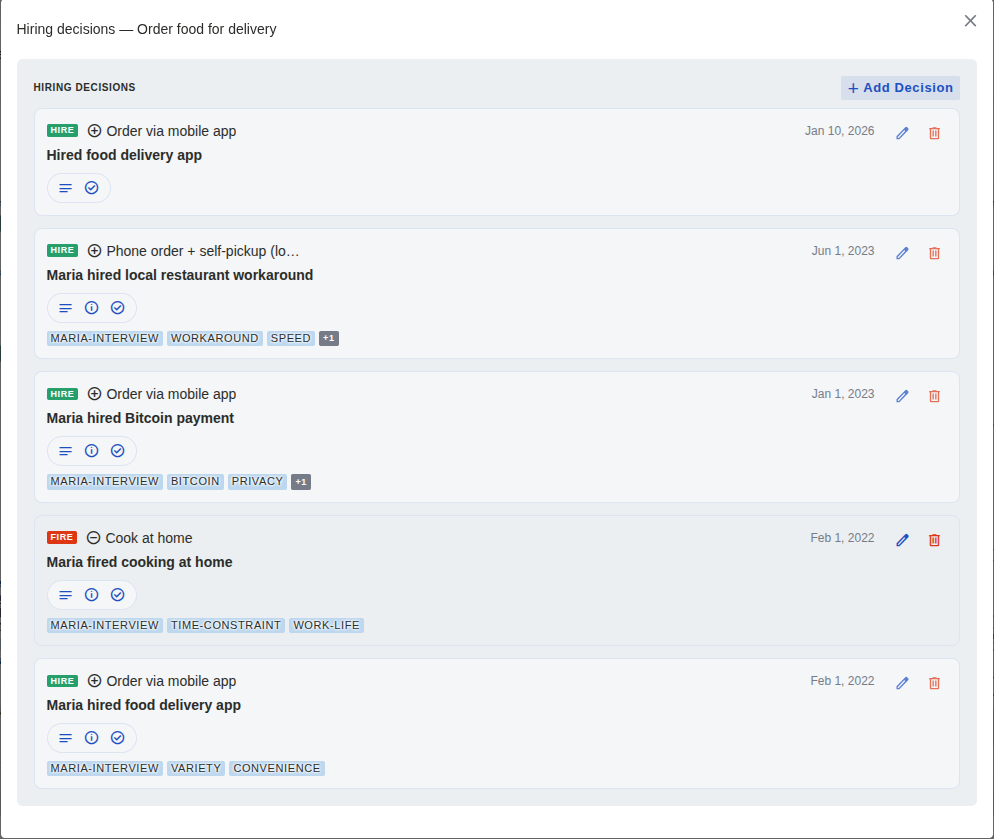
One job's timeline, newest first: the solution, the date, and the research each entry rests on. (Click to zoom)
Each row shows the decision's type, the solution it names, its title and date, buttons that reveal its description, context and outcome, and its tags. Rows also carry the same read-only opportunity badge used on the canvas, listing the opportunities the decision relates to.
Recording and Editing Decisions
Viewing, adding, editing and deleting all happen in the timeline modal, in one form.
From the canvas
- Hover the job card and click its hiring-decisions control
- Click Add Decision
- Pick the type and the solution it concerns, give it a name, and describe the decision, its context and its outcome. For a switch, name the previous solution and the trigger
- Set the decision date (defaults to today), add tags, and link any opportunities it addresses
- Use the edit or delete control on any row to change or remove a decision
- Close the modal to return to the canvas with that job still selected
Without a pointer
In the Blueprint's keyboard outline each job carries a "Hiring decisions for …" button that opens the same modal. Focus returns to that button when you close it, and every change is announced.
Opportunities
The form's Opportunities section links the decision to the open questions it acted on, even for a brand-new decision: links picked before it is saved are held and applied the moment it exists.
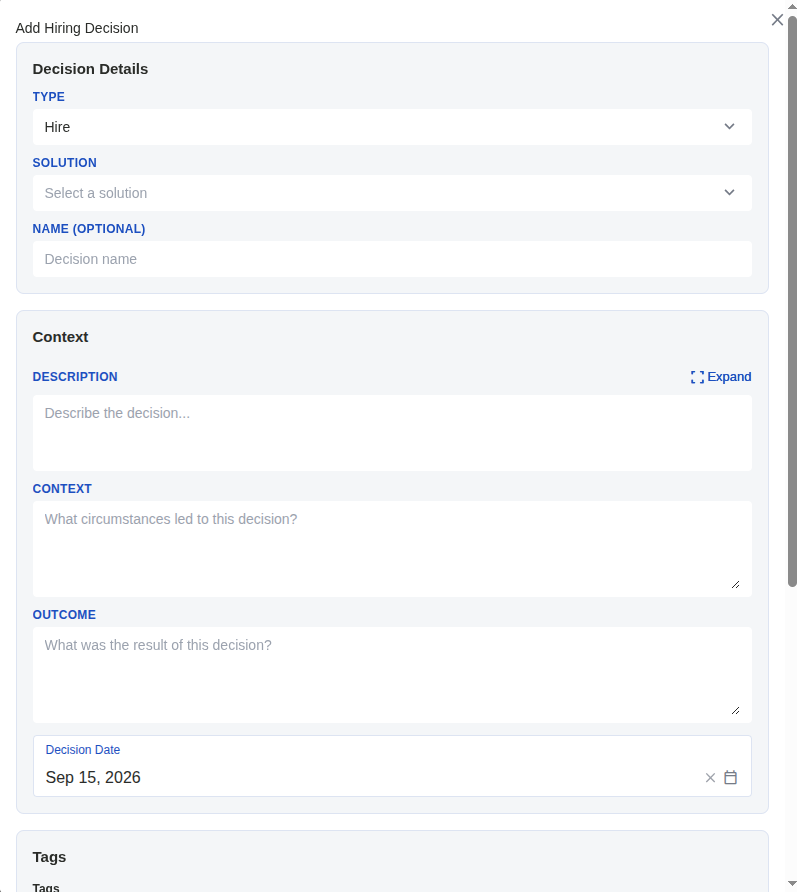
The decision form. Type and solution are the essentials; context and outcome are where the value lives. (Click to zoom)
Worth knowing: no badge or counter on the canvas shows which jobs have decisions recorded; open the timeline to find out. (Opportunities do get a badge on the card.)
Building Institutional Memory
Traditional process documentation
- descriptionDocuments the current process only
- descriptionNo record of what was tried before
- descriptionFailed experiments get repeated
The hiring-decisions timeline
- checkDocuments evolution over time, per job
- checkKeeps what worked, what failed, and the trigger for each switch
- checkTies each decision to the research and opportunities behind it
Real example: "Switched from car delivery to drone delivery — trigger: traffic congestion." When someone asks why a year from now, the answer is in the timeline, not in old emails or a departed colleague's memory.