
Links & Relationships
How everything connects in RoleDream
The Problem RoleDream Solves
In most tools, relationships are one-directional. You can see what resources a process uses, but you can't see which processes use a given resource. RoleDream makes all relationships bidirectional and typed.
Traditional Tools
Can't answer: "What breaks if we change this resource?"
RoleDream
Easy to answer: "Show me all processes using this API"
Example Relationships
RoleDream tracks multiple types of relationships between entities:
Research → Solutions
Which interviews informed this solution?
Reverse: Which solutions came from this interview?
Resources → Solution Steps
What tools are needed for this step?
Reverse: Which steps use this tool?
Segments → Jobs
Who performs or needs this job?
Reverse: Which jobs does this segment reach?
Customers → Segments
Which customer profile does this customer match?
Reverse: Which customers are in this segment?
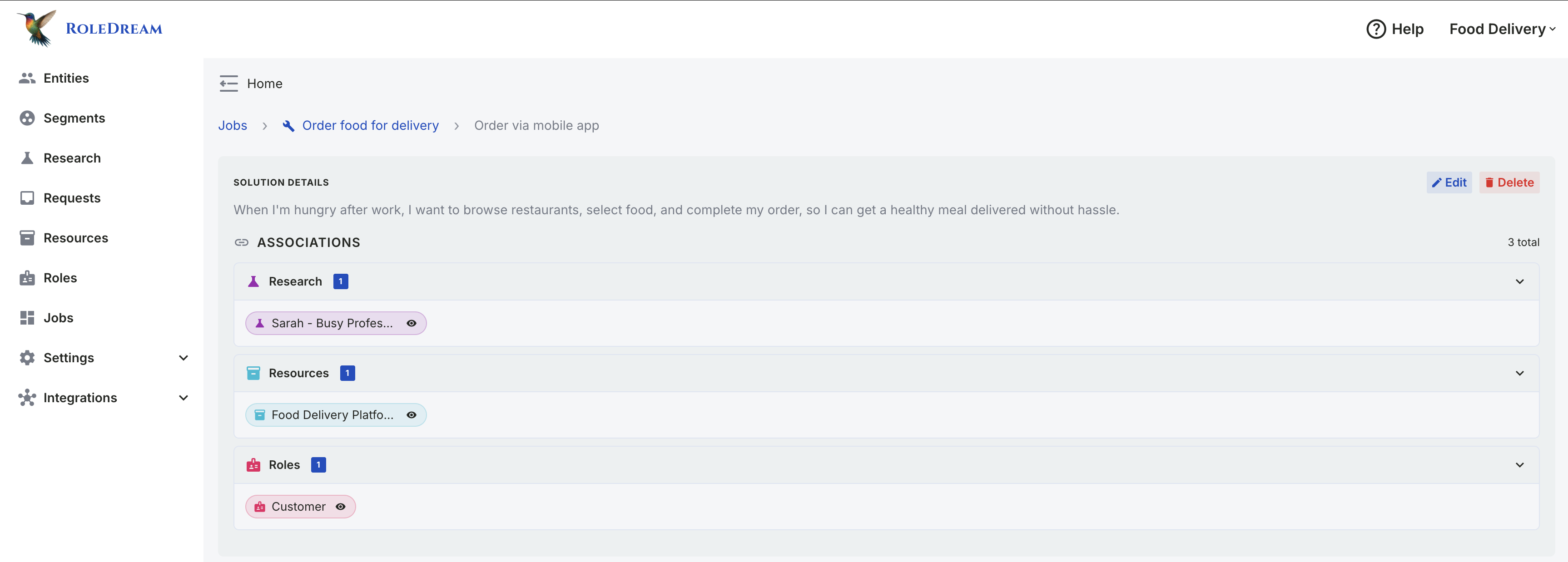
Associations panel showing multiple link types: Research, Resources, and Customers. Each link is bidirectional—visible from both the solution and the linked entity. (Click to zoom)
Why Bidirectional Matters
The reverse lookup capability enables critical use cases that aren't possible with one-way relationships:
Impact Analysis
Before changing or deprecating a resource, see which solutions depend on it.
"If we deprecate this API, what breaks?"
Dependency Mapping
Identify critical resources that many processes rely on.
"Which tool is our biggest single point of failure?"
Optimization
Find underutilized resources or consolidation opportunities.
"Can we merge these two similar tools?"
Real Example: Resource Impact Analysis
Click on "Food Delivery Platform" resource → See all 3 solutions that depend on it (car delivery, drone delivery, bicycle delivery). Now you know: if this platform goes down, three different delivery methods are affected. This visibility enables informed decision-making.
Creating Links
On an item that already exists, links are created immediately when you establish them — no form save needed, and both sides of the relationship update in real-time. You can also add associations while you are still creating a new item: choose them in the form and they are attached the moment it saves. If the thing you want to link to doesn't exist yet, you can create it inline without leaving the form.
From Solution Perspective
- On the Blueprint, select a job and open the solution's tab
- Hover that tab and click the edit (pencil) control inside it
- Find the "Associations" section in the form
- Use the "Link Resources" control (or Research, Segments, etc.) and pick the entity
- Link is created immediately — you can remove links here too
From Resource Perspective
- Open any Resource's page from the Resources menu
- Find the "Associations" section
- The link appears automatically — this view is read-only
- Both sides stay synchronized
- No manual syncing required
Linking while creating
You no longer have to save first. Pick associations in the create form and they are attached the moment the new item is saved. If saving the item succeeds but an association can't be attached, the item is still created and you're told which link didn't take.
Creating a link target inline
In the link picker, choose + Create new to add the item you want to link to right there. The new item is created, selected, and linked without leaving the form you started in.
boltReal-time updates: When you create a link from the solution side, the resource side updates instantly. Other users see the change immediately.
Design Philosophy
RoleDream treats relationships as first-class entities, not afterthoughts. Every relationship is:
- checkBidirectional — Visible from both sides
- checkTyped — Relationships have meaning (research informs, resources are used by)
- checkReal-time — Updates propagate instantly to all users
- checkQueryable — You can ask questions in both directions
This design enables RoleDream to answer questions that other tools can't, making it uniquely powerful for understanding complex systems and processes.