
Core Concepts
How RoleDream models the way work actually gets done — and how it all connects into one flow
What is RoleDream?
RoleDream maps how work actually gets done: who does it, what they do, and what they use. Think of it as process mining for human work — instead of reading system logs, you capture how people really operate from documents, interviews, and observation, and RoleDream turns it into a connected, visual model.
The Problem It Solves
RoleDream exists because a tool was missing: nothing could map jobs to be done together with the real resources that serve them, and show how they touch. That gap has familiar consequences:
- link_offJobs and operations live in separate tools — research on what people need in one place, process maps and systems in another. Nobody can answer "which flows does this tool, system, or screen actually touch — and how?"
- sync_problemAS-IS and TO-BE are too heavy to map — documenting the current state and designing the target takes so much effort it rarely happens, and even more rarely stays up to date.
- visibility_offWaste hides in plain sight — without the connected picture, duplicated tools, dead steps, and inefficient flows go unnoticed, and optimization opportunities with them.
RoleDream closes that gap: one connected model of jobs, flows, and resources that is genuinely easy to map and keep current — especially with an AI assistant doing the heavy lifting. Compare AS-IS against TO-BE, spot the waste, and build more efficient flows — whether the work is done by humans or by automation.
Three Questions, One Model
Every object in RoleDream answers one of three questions. Together they form the core triangle the whole model is built on.
Who
does the work — and who it's for
The single object for anyone the work involves: customers, personas, cohorts, teams, departments, organizations — and individual positions such as a Sales Director or a Support Engineer.
Each segment carries a type your workspace defines — customer, persona, team, role, or whatever fits — so the same object reads correctly for a market segment and for one named position.
What
needs doing — and how it's done today
Stable goals, independent of any tool or method. "Deliver food" doesn't change.
A concrete way to accomplish a job, broken into ordered steps. Solutions come and go; the job stays.
How
the work runs
Tools, systems, documents, equipment, even buildings and rooms. They nest to mirror real structure: Platform → App → Feature, or Factory → Line → Station.
One Object for Every Actor
There is no separate object for individuals. A named position — a Sales Director, a Machine Operator — is a segment too, typically of a type such as role or position, linked to its jobs like any other. When "the Support Team" does the work, model the team as a segment; add a position-level segment only where one named position genuinely does something different. One object for every actor is what lets the Blueprint group and light up consistently.
One Chain Connects Everything
Objects on their own are just an inventory. The model comes alive through links — and they follow one consistent chain, the same chain the Blueprint traverses when you select a segment. Each stop below names the link you create and the rule that keeps the flow readable.
Segment
Segment ↔ JobSegment ↔ SegmentLink a segment to the jobs it performs or needs done as the main actor — the one who actually does it, or whose need drives it. Supporting players don't get this link. Segment-to-segment chains are for real structure only: a profile decomposing into its personas, a team inside its department. The Blueprint reads that chain as a breakdown, not a loose association — the segments you link on to sit on a row below and are counted in their own sub-segments box, so closing that box tucks the whole chain away with it.
Job
Job ↔ JobChain jobs that feed into or decompose into each other, in small clusters of roughly five to seven. Avoid one "umbrella" job linked to everything — a job whose only purpose is to group other jobs shouldn't exist.
Solution & Steps
Each job carries one or more competing solutions, and each solution breaks into an ordered step tree — this is where the process detail lives, not in long descriptions. Where the work splits, sub-steps that run one after another share a branch, and sub-steps that run at the same time sit on branches of their own.
Staged Resources
Step → ResourceThe one place resources enter the flow: stage a resource under the exact step that uses it, in the Frontstage lane (customer-visible) or Backstage lane (behind the line of visibility).
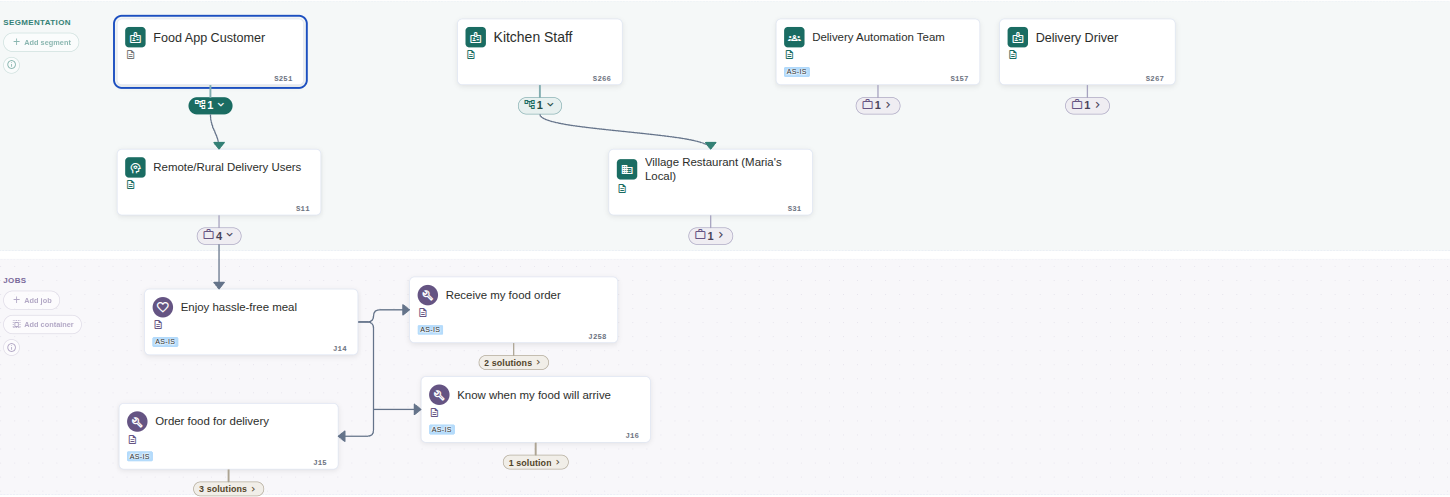
The flow chain on the real canvas: a segment breaking down into a sub-segment, which links on to its four jobs. Each kind of connection leaving a card gets its own small box below it, counting what hangs directly beneath through that connection, and every line starts at the box that counts it. (Click to zoom)
Jobs Are Stable, Solutions Get Hired
The sharpest distinction in the model: a job is a stable goal that exists whether or not anyone is working on it, while a solution is one concrete, current way of accomplishing it. You don't "hire" a job — you hire a solution for it, and you can fire it when something better comes along.
Example: "Deliver order" is the job. "Deliver by car" and "Deliver by drone" are competing solutions — each with its own steps, its own resources, and its own trade-offs. Hiring Decisions record when a solution is hired, fired, or switched, and why — building a history of what works. Learn more about Hiring Decisions →
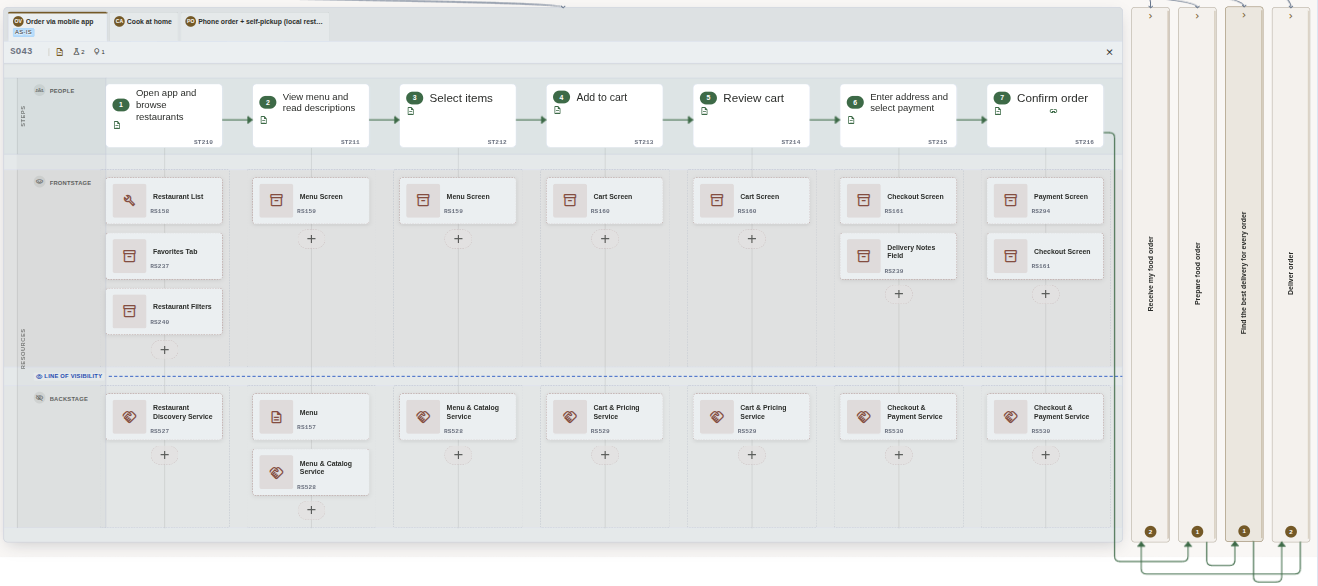
One job, three competing solutions as tabs — "Order via mobile app" is the one currently hired (as-is). The active tab shows the step sequence and the resources staged under each step. (Click to zoom)
Not everything is a job
Most of what you hear in interviews and read in process docs is not a job — it's an activity, a pain, or a complaint about a tool. A real job passes two tests: it is solution-agnostic (it would still exist if the current tool disappeared) and it states its own outcome. Everything else finds a better home:
"We need to get X out of the current tool…"
southA solution concern — with the complaint recorded as research
"First we capture the labour time per step…"
southA solution step under the bigger job's solution
"Honestly, the handover is where it always breaks."
southResearch — a quote or observation linked to the job as evidence
Expect few real jobs — a handful per segment — with many steps and much research underneath them.
Staged Once, Connected Everywhere
You stage a resource in exactly one place: under the step that uses it. From that single link RoleDream derives the rest — the solution gains the resource, and the job connects to the resource's whole hierarchy. Never link a resource directly to a solution or a job; the step link is the source of truth, and the derived connections stay correct even as your resource hierarchy changes.
That single-source staging is what makes the reverse lookup trustworthy: two-way visibility between jobs and resources, without anyone maintaining it by hand.
Job → Resources
Select a job on the Blueprint to see the resources staged under each of its steps, split into the Frontstage and Backstage lanes.
Resource → Jobs
Open any resource to see all the jobs and solutions that depend on it — how one tool, system, or artifact connects across your entire operation.
Why This Matters
Before changing a resource, see which jobs will be affected.
Identify critical resources that many processes rely on.
Find underutilized resources or consolidation opportunities.
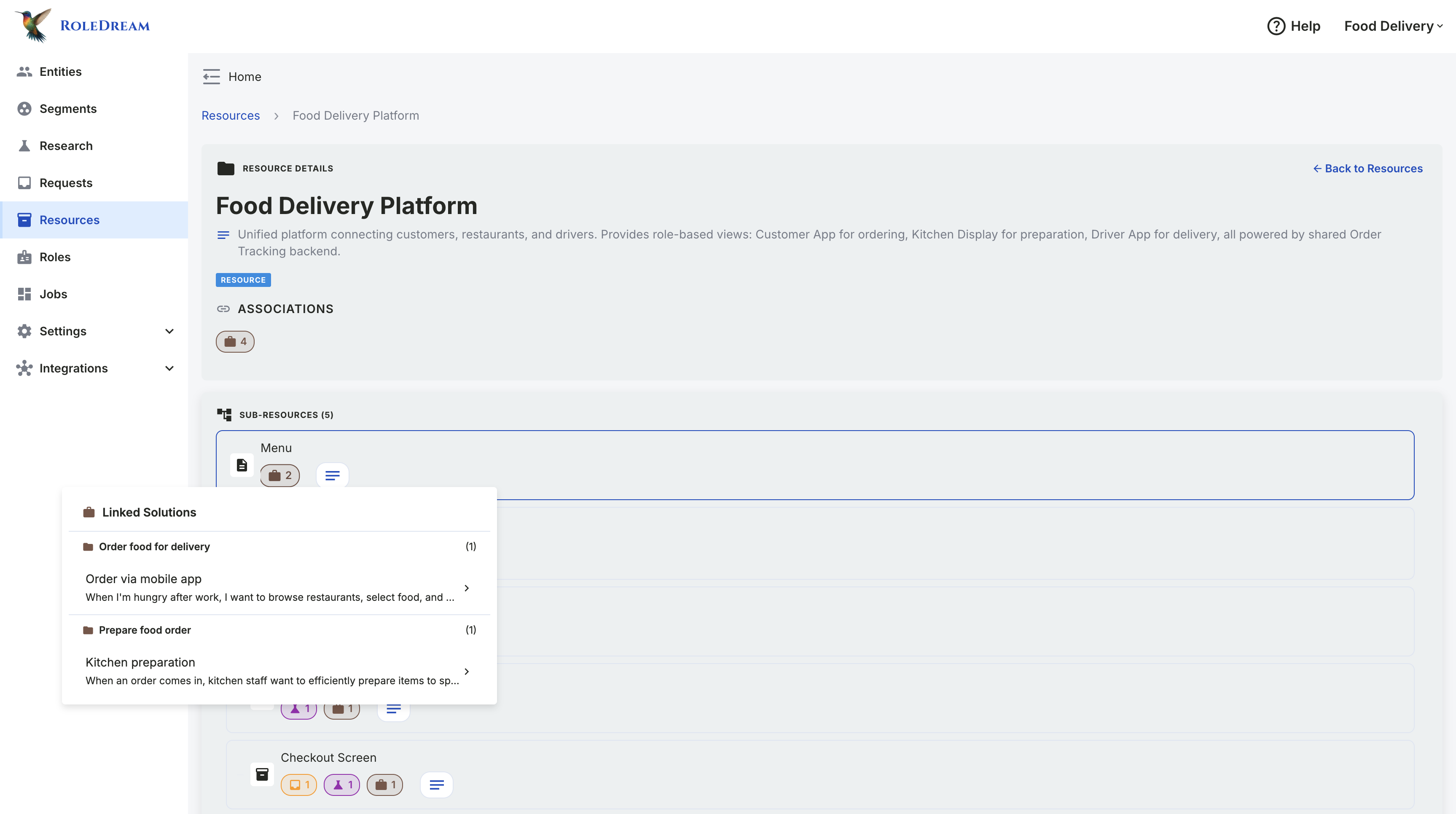
Resource → Jobs on the resource's own page: the Food Delivery Platform shows every job and solution that touches it. This reverse lookup enables impact analysis: "If we deprecate this API, what breaks?" (Click to zoom)
Where You See It: The Blueprint
The Blueprint is RoleDream's home view — one zoomable canvas holding the entire model, read top to bottom in three bands that mirror the flow chain:
From AS-IS to TO-BE — and On to Working Solutions
The model is not documentation for its own sake — it is a working surface for change. Capture how work happens today, design how it should work right next to it on the same canvas, and use the precision of the flows to build what comes after.
Map the AS-IS
as-isCapture the current flows from documents, interviews, and observation. Everyone finally sees the same picture: who does what, with which tools, and where it hurts.
Design the TO-BE
to-beJobs stay, solutions change: sketch a better solution right beside the current one and compare them against the same job. When you make the switch, a hiring decision records it.
Build From the Flow
constructionA well-described TO-BE flow — the job, its steps, the resources behind them — is already close to a specification. Use it to generate prototypes, or as the blueprint for the real solution.
smart_toy AI Makes This Loop Fast
Connect Claude — or any assistant that speaks MCP — and the whole cycle accelerates: hand it a process document or an interview transcript and the AS-IS drafts itself; talk through improvements and TO-BE solutions take shape beside the current ones; then ask it to turn a flow into a working prototype. The assistant understands this model — the chain, what counts as a segment, what makes a real job — so what it creates lands correctly on the canvas.
Supported Frameworks
The model is methodology-agnostic. Pick a framework, blend several, or build your own path — the same objects and links carry all of them.
Service Design
The step tree maps service blueprints; the Frontstage/Backstage lanes are the line of visibility, drawn natively on the canvas.
psychologyJTBD Research
Jobs, competing solutions, and hiring decisions map Jobs To Be Done directly, with research linked as evidence.
account_treeProcess Documentation
Document workflows step by step, mark who or what performs each one, and track the resources each step depends on.